For Microsoft Dynamics 365 Business Central

The CRM pipeline. Inside Business Central.

Sales Pipeline Board turns your Sales Quotes into a drag-and-drop Kanban board with weighted forecasts, stage-aging alerts and one-click conversion to Sales Orders — all without leaving Business Central or paying for a separate CRM.
6 stages
configurable Kanban columns
< 5 min
wizard-driven setup
BC 29+
cloud and on-prem
businesscentral.dynamics.com / Sales Pipeline Board
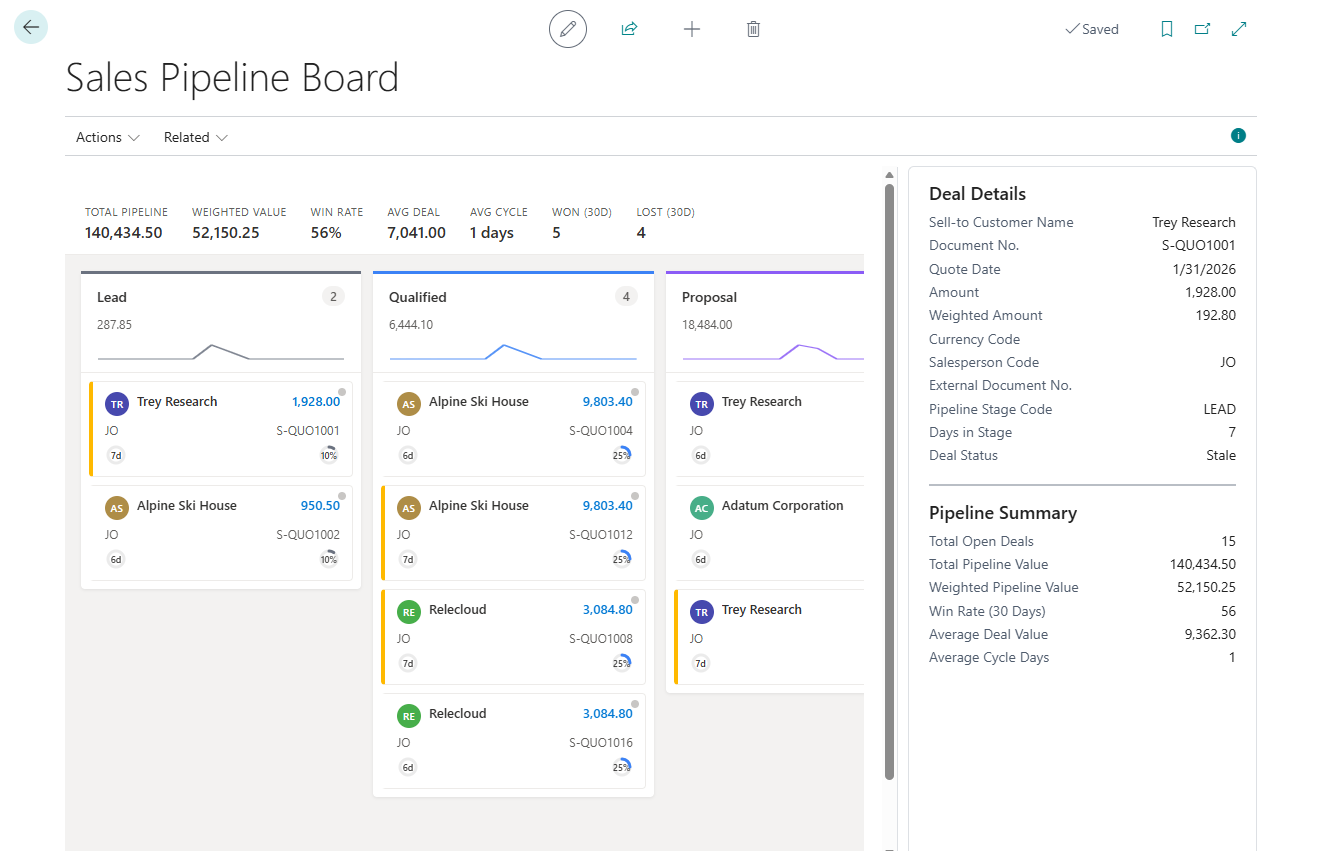
Sales Pipeline Board kanban view
Weighted pipeline · 52,150.25
Live forecast across all stages
Stale deal flagged
7+ days · S-QUO1001 · Trey Research
Built on Sales Quotes — no parallel CRM
30-day free trial · auto-provisioned
Drag-and-drop Kanban interface
Runs on your tenant — no data leaves BC
Loads from YouTube when you click
Four ways to run your pipeline

One board. Every angle on your deals.

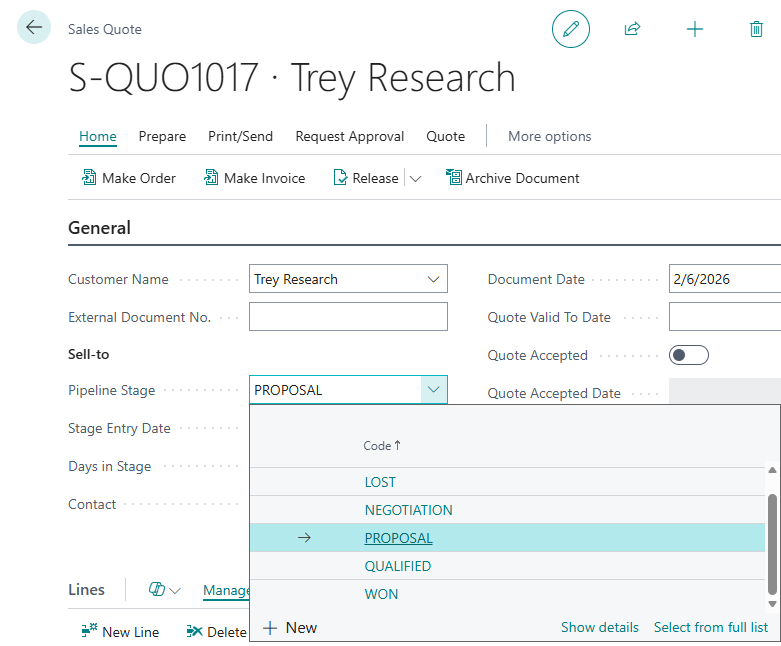
The same Sales Quotes, recast as the view you need right now — the full pipeline, the closing-end columns, a single-card focus, or the original Sales Quote with its new Pipeline Stage field.
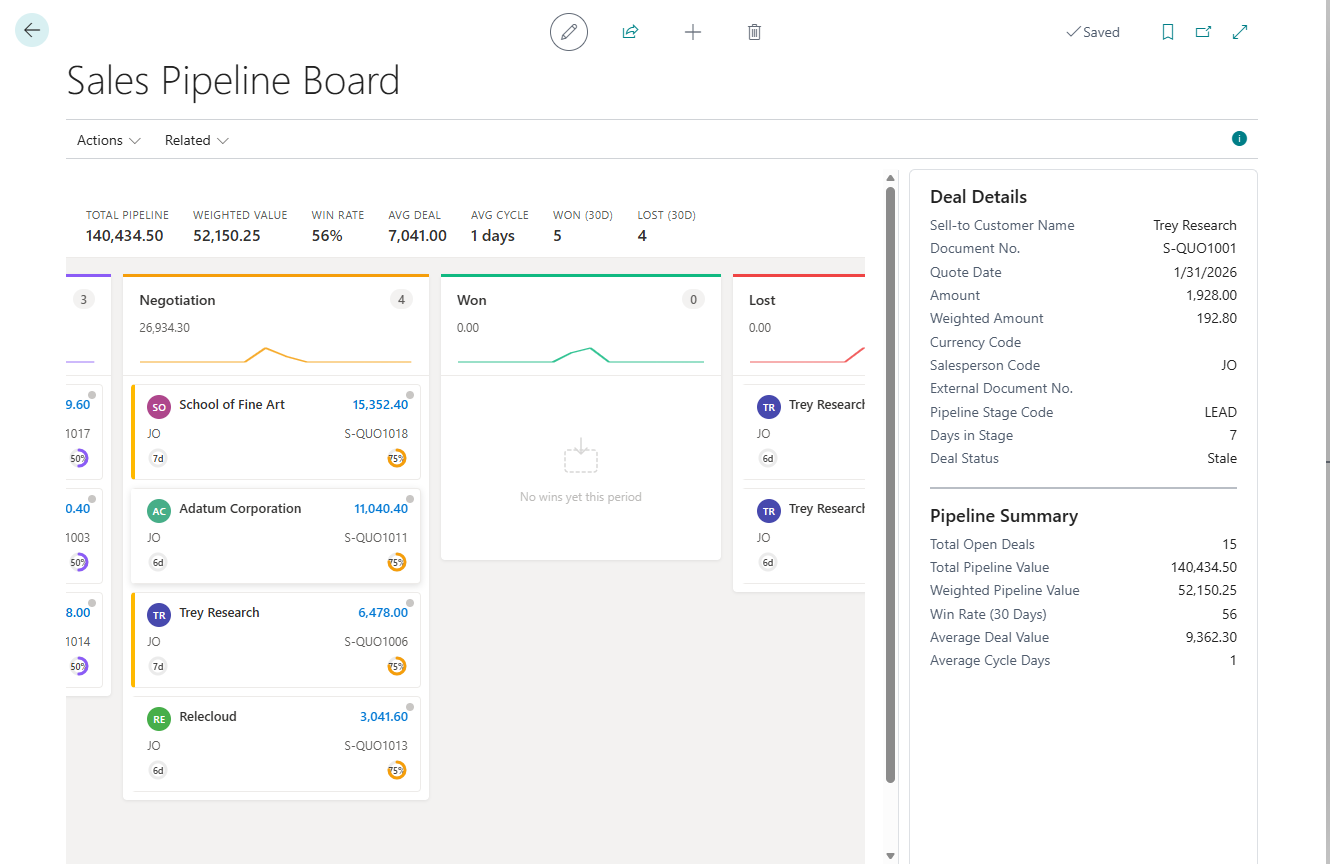
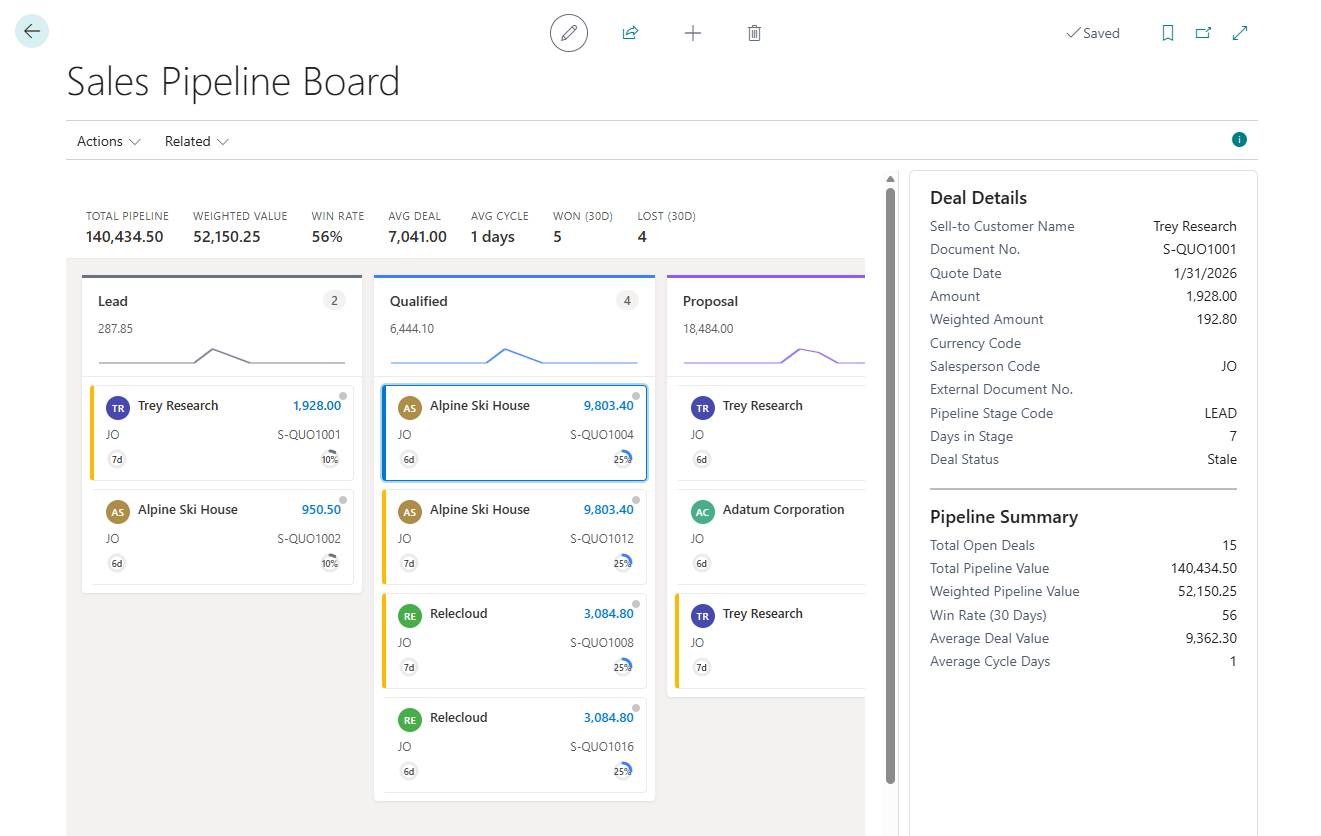
Full pipeline boardNegotiation, Won and Lost columnsCard focused with FactBoxSales Quote with Pipeline Stage field
Lead Qualified Proposal Negotiation Won Lost
Pipeline stages · fully configurable

Six stages out of the box. Reshape them in minutes.

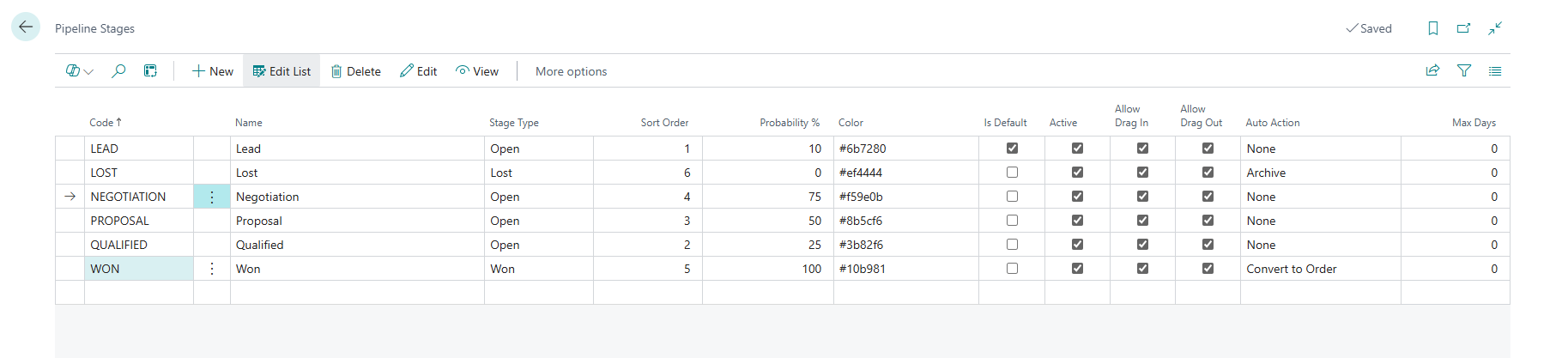
Every stage carries a probability %, a colour, a sort order, a stage type (Open / Won / Lost) and an optional Auto Action. Drop a deal into Won and an order is created. Drop into Lost and it archives. No workflow editor required.
LEADInitial interest capturedProb 10%Open
QUALIFIEDBudget & need confirmedProb 25%Open
PROPOSALQuote sent to customerProb 50%Open
NEGOTIATIONPricing & terms in playProb 75%Open
WONClosed — convert to Sales OrderProb 100%Auto-Order
LOSTClosed — archive the quoteProb 0%Auto-Archive
Pipeline Stages · setup
Pipeline Stages list
What's on every card

Twelve signals on every deal — at a glance.

Every Quote becomes a card with the customer, value, salesperson, stage age, and a stale-deal warning. Defaults are tuned for typical B2B sales cycles; everything is reconfigurable.

Weighted forecast

Total Pipeline, Weighted Value, Win Rate (30d), Avg Deal, Avg Cycle, Won and Lost — all live in the header KPI strip.

Stale-deal detection

Configurable warning and critical thresholds (default 7 / 14 days). The card border turns amber, then red. The deal status flips to Stale.

One-click Won → Order

Drop a card into Won and the standard Sales Quote → Sales Order conversion fires. Lost archives the document automatically.

Per-stage sparklines

A 30-day trend line sits at the top of every column so you can see whether the stage is filling, draining or stuck.

Configurable thresholds

Set probability per stage, sort order, max cards per column, view mode (All Deals / My Deals), and default sort (value / age / customer).

Right-click quick actions

Open Quote, Make Order, View Stage History, Mark Won, Mark Lost — all from the card without opening the document first.

No parallel system · no double entry

Your Sales Quote is the deal record.

Sales Pipeline Board doesn't add a new "Opportunity" table or a separate CRM. It extends the standard Sales Quote with a Pipeline Stage field, a Stage Entry Date and a Days-in-Stage counter. Move the card on the board, the field updates on the Quote. Edit the field on the Quote, the card moves.
  • ✓New Pipeline Stage dropdown on the Sales Quote, with the same colour-coded list as the board.
  • ✓Stage Entry Date and Days in Stage stamped automatically when the stage changes.
  • ✓Stage history kept on every quote — auditable timeline of who moved it, when, and from where.
  • ✓New quotes drop into your default stage (Lead) automatically — no extra clicks.
Sales Quote · S-QUO1017 · Trey Research
Pipeline Stage field on Sales Quote
Sales Pipeline Board · setup
Setup card
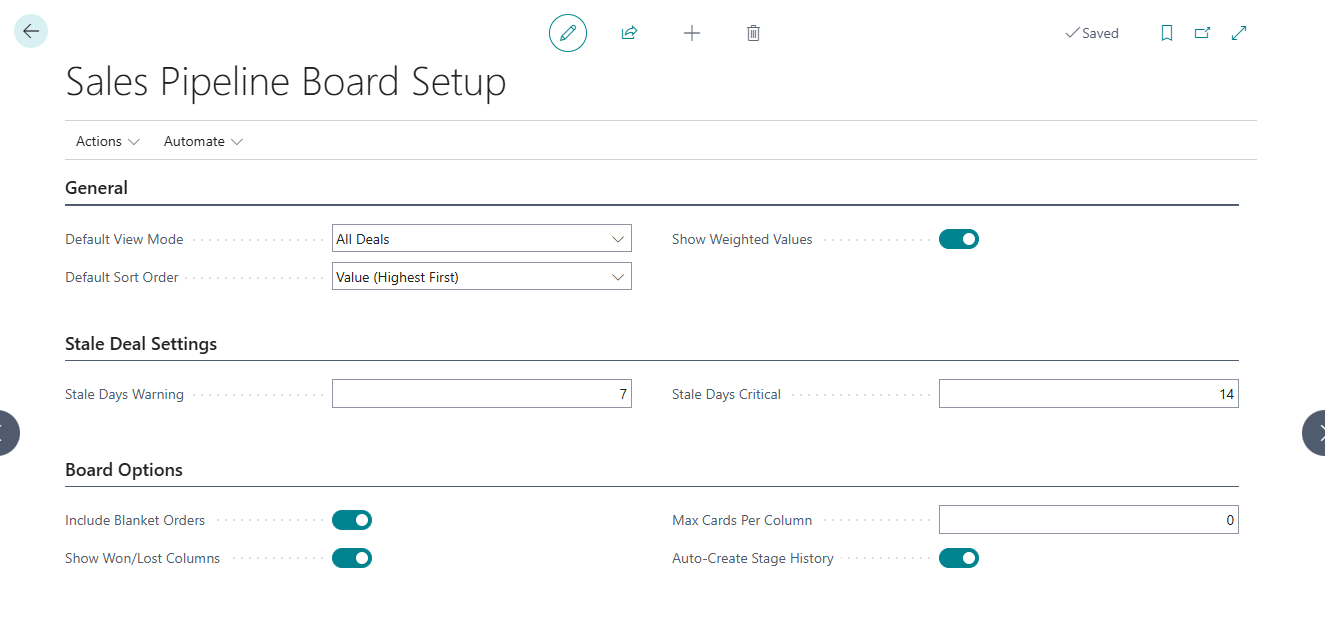
Tunable defaults

Behaves the way your sales team works.

Stale Days warning and critical thresholds, default sort, blanket-order inclusion, max cards per column, weighted values toggle and Won / Lost column visibility — everything you'd expect to control on a real CRM, on one page.

  • ✓View mode: All Deals or My Deals — filter by salesperson at the board level.
  • ✓Default sort: Value (highest first), Age in stage, Customer name, or Document number.
  • ✓Stale thresholds: Set Warning days and Critical days separately per company.
  • ✓Auto-create stage history toggle — capture every stage transition on every quote.
Four-step setup wizard

From AppSource install to a working board in under five minutes.

The wizard discovers existing pipeline stages (or creates the six defaults), wires up the Pipeline Stage field on Sales Quote, sets your stale-deal thresholds and runs the first board snapshot. No code, no consultant, no parallel CRM rollout.
  1. 1
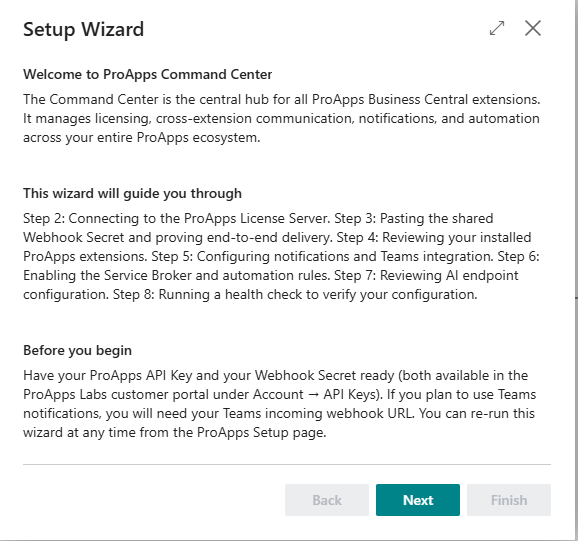
    Welcome
    The wizard explains what it will configure: board display, stale thresholds, and pipeline stages.
  2. 2
    View settings & thresholds
    Pick default view mode, default sort, weighted values, stale Warning / Critical days, blanket-order inclusion.
  3. 3
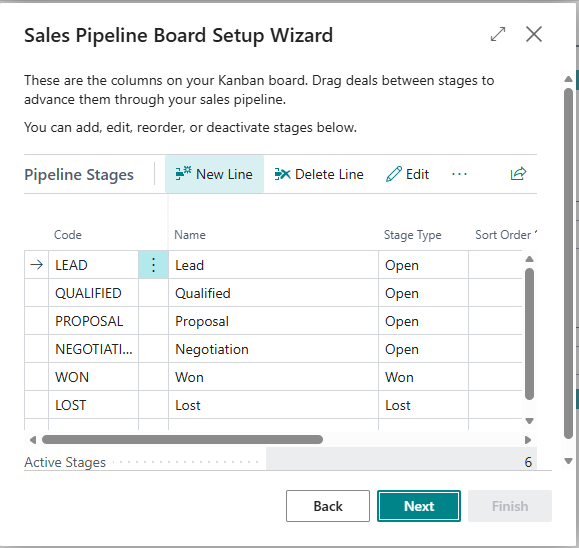
    Pipeline stages
    Six stages found and ready — Lead, Qualified, Proposal, Negotiation, Won, Lost. Add, rename or reorder inline.
  4. 4
    Finish
    New quotes start in the default stage. Open the board, drag cards between columns, right-click for quick actions.
Setup wizard step — pipeline stages
Sales Pipeline Board Setup Wizard
Setup wizard welcome
Simple, per-tenant pricing

Try it free for 30 days. Keep it for $39 a month.

The trial is auto-provisioned the moment you install from AppSource — no credit card, no setup call. ProApps Command Center is bundled. Every other ProApps extension you add later shares the same configuration and dashboard.

Full Access
$39/mo
Per Business Central tenant. Unlimited users, unlimited deals.
  • Drag-and-drop Kanban board
  • Configurable stages & probabilities
  • Stale-deal detection
  • Weighted forecast & KPIs
  • Stage history & audit trail
  • ProApps Command Center included
Start 30-day free trial
Auto-provisioned on install · cancel anytime
Better together

Supercharge with the ProApps Ecosystem

Every ProApps extension talks to every other. Add a companion extension and unlock capabilities that neither can deliver alone.

Advanced Approval

+ Combined power

Gate stage transitions on approval rules — any deal over $50 K can't move past "Proposal" without manager sign-off. The drag is intercepted, an approval fires, and the card only moves after approval completes.

Learn more about Advanced Approval →

Teams Notifications

+ Combined power

Real-time notifications for deal won, deal lost, deal stale, and stage changes — sales managers get a Teams message the moment any deal on their team exceeds the critical stale threshold.

Learn more about Teams Notifications →

Payment Integrator

+ Combined power

When a deal hits "Won" and converts to an order, auto-trigger a payment link or charge on the configured gateway (Stripe, Square, Braintree, Adyen, or Authorize.net). Pipeline Board broadcasts the order-created event; Payment Integrator listens and initiates collection.

Learn more about Payment Integrator →

Duplicate Detection and Merge

+ Combined power

Flag when a new quote is created for a customer who already has an active deal on the board — prevents two salespeople from working the same opportunity.

Learn more about Duplicate Detection and Merge →

Data Quality Copilot

+ Combined power

AI deal scoring — analyze deal attributes like amount, customer history, days in stage, and stage velocity to surface a health score directly on each deal card.

Learn more about Data Quality Copilot →

Nearest Vendor

+ Combined power

When a won deal requires procurement, automatically find the nearest or best-fit vendor for the items on the order using Nearest Vendor's geolocation scoring.

Learn more about Nearest Vendor →

Field Validator

+ Combined power

Enforce data quality rules on quotes before they can advance — a quote can't move to "Proposal" unless shipping address and payment terms are populated.

Learn more about Field Validator →

Frequently Asked Questions

Sales quotes. Each quote is a deal card you drag between stages, and blanket orders can be shown too if you turn that on in setup. Double-click a card to open the quote.
Yes. Six stages are seeded: Lead (10%), Qualified (25%), Proposal (50%), Negotiation (75%), Won (100%) and Lost (0%). Add, rename, reorder, recolor or deactivate them from Setup, Configure Stages. New quotes go to whichever stage is marked as the default.
Won runs Convert to Order by default: the board asks you to confirm, then runs Make Order on the quote. Lost archives the quote. Set a stage's Auto Action to None to turn either off. Won and Lost deals are left out of the Total Pipeline figure.
Yes. Every quote has a Pipeline Stage Code field on the General FastTab. Change it on the quote and the card moves; drag the card and the field updates. Each move is written to Stage History with the old and new stage, the user, the time and the days spent in the previous stage.
You set warning and critical thresholds in days. A card turns amber after the warning threshold and red after the critical one; with 7 and 14 days, a deal 10 days in one stage is amber and one at 15 days is red. Thresholds set on a stage override the global ones.
My Sales uses the salesperson code on your User Setup record. If none is set, the view is empty until an administrator adds one.
The summary bar shows total pipeline, weighted value and win rate. Each column shows its deal count, total value and a 14-day trend. The Analytics view adds win and loss charts, a stage conversion funnel, deal velocity and a salesperson comparison, and a Role Center cue part shows open deals, pipeline value and deals won this month.
SPB Admin-SPB, for people who configure stages and board settings, and SPB User-SPB, for people who work deals on the board.
Yes. It publishes events for stage changes, won and lost deals, stale alerts and order creation to Command Center, where they can drive automation rules and notifications.
The 30-day trial starts on its own when you install Sales Pipeline Board from Microsoft AppSource, with every feature on, and there's one trial per extension. ProApps Command Center installs alongside it and shows the days left. To keep going after the trial, subscribe on www.ProAppsLabs.com and enter the license key from your license email in Command Center under Subscription Management, Activate License Key. Your account page lists your licenses and when each key was sent; if you lose the email, contact support to reissue the key. Command Center rechecks the license every 24 hours. If the trial ends, or a paid license expires or is suspended (after a failed renewal payment, for example), Sales Pipeline Board keeps working for a 7-day grace period so you can subscribe or fix the payment; after that, Command Center restricts it.

What's New

Version 28.0.0.0

Release date pending

  • Initial Microsoft AppSource release.